Survey every asset once. Issue everything from it.
Condition surveys for building fabric (CSA) and building services (MEP), recorded on site on a phone or tablet, with or without signal. The same record becomes the report, the Excel asset register, the lifecycle cost plan and the snag list.
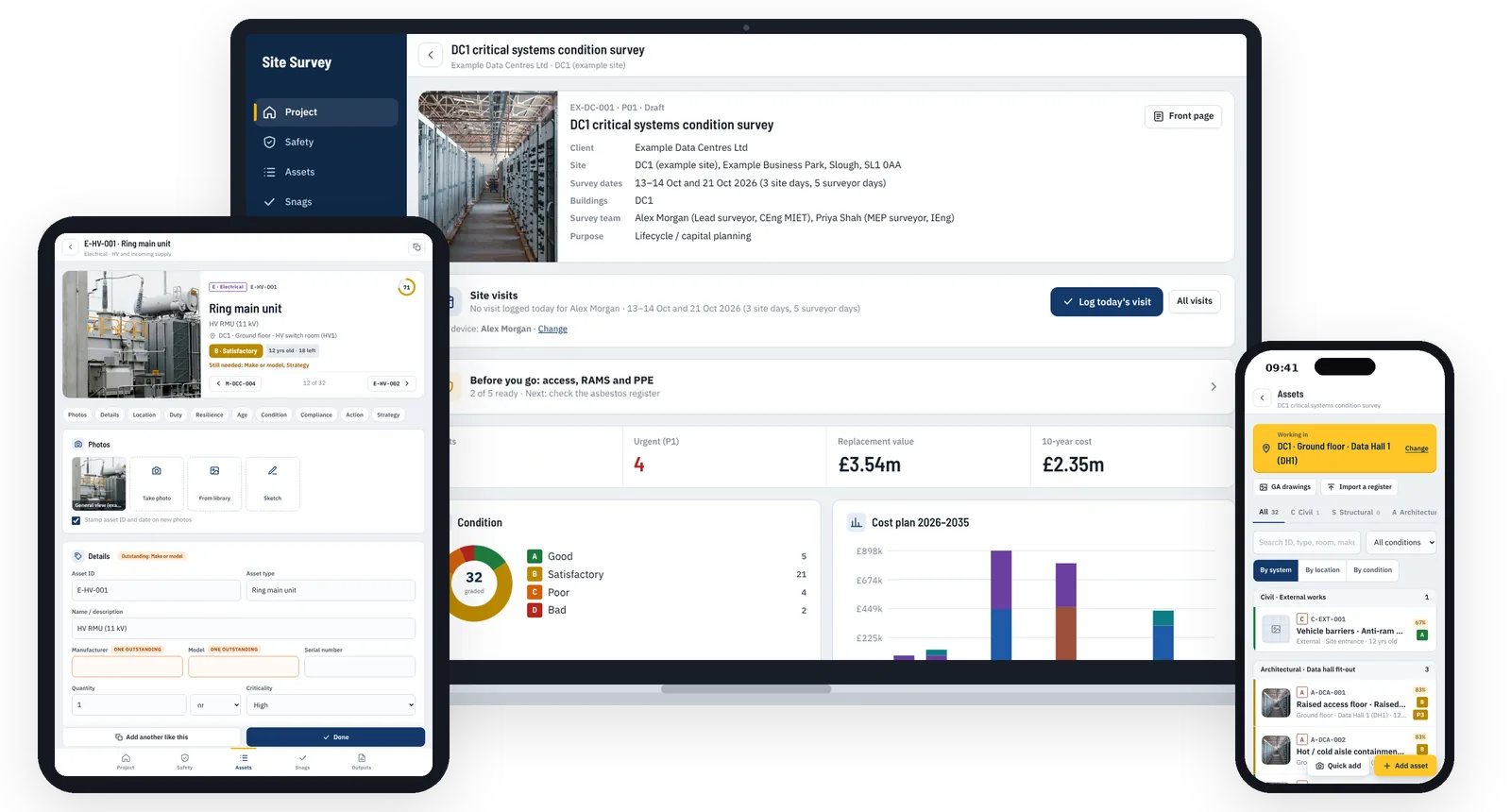
From the access request to the lifecycle plan
Everything a survey team needs, in the order you need it.
Plan the visit
Site access requests by email or Word letter, RAMS with editable controls, PPE and kit lists, and a planned visit for each surveyor, with everyone's vehicle and mobile number for the site.
Record on site, offline
Quick add in a few taps: photo, type, grade, next. Set where you're working once and every asset is placed there. Photos can be marked up, and a site visits log records who was on site each day, with the weather.
Every type of asset
Hundreds of CSA and MEP asset types, each with its typical life, compliance checks and a starter replacement rate. Data centre surveys add a full campus library: grid connection, critical power and cooling, fire, security, telecoms and IT.
Drawings, sketches and GIS
Pin assets on GA drawings, sketch dimensioned details, and place a drawing on the map, so every asset gets real coordinates for ArcGIS, QGIS or Google Earth.
Costs and life expectancy
Remaining life, replacement year and replacement strategy for each asset, with your own price book. A lifecycle cost plan over 5 to 25 years, by discipline, with contingency and fees.
Snagging
Quick snags by trade and priority, with before and after photos and drawing locations. Contractors can mark snags fixed in the team edition; only the survey team closes them.
Client-ready outputs
PDF and Word report (standard or arranged as the client's deliverables), Excel asset register, CSV for CAFM, QR asset labels, GIS exports, RAMS, and a return visit list for anything still to do.
Steered by the purpose
Condition survey, asset tagging, PPM set-up, lifecycle planning, due diligence, dilapidations, FM mobilisation, reinstatement, decarbonisation or EPC survey: the app asks for what that purpose needs and adds the matching report section.
Set up for the kind of site
Choose the sector when you start a survey. It puts that sector's asset types first, switches on its checks and pre-selects its site hazards.
Data centres
Critical power, cooling and white space, with a resilience review: redundancy, single points of failure and loading.
Commercial and industrial
Offices, retail, logistics and industrial units, from roofs and fabric to plant rooms.
Residential
Blocks and estates, with fire doors, communal services, and EPC registers and surveys.
Nuclear decommissioning
Safety classes, licence condition 28 examinations and radiological hazards.
One surveyor or a whole team
Both editions have every feature. The difference is where the data lives and how many people use it.
Single Surveyor edition
For one surveyor on their own devices.
- One file that opens in your browser, on a phone, tablet or laptop
- Activated with a licence key; works fully offline
- Surveys stay on your device; back up and restore to move them
- User manual included
£395 per year
One person, one licence key.
Team edition
For survey teams on your organisation's Microsoft 365.
- Sign in with your work account and MFA
- Several surveyors on one survey at once, merged field by field
- Saved in your SharePoint, with a site per project if you want one
- Outputs filed in the survey's SharePoint folder
- Contractor logins for snags
- IT set-up guide and named seats
£49 per user per month, billed yearly (£588)
Minimum 5 users. £39 per user per month from 20 users. One-off set-up and onboarding £1,500: IT set-up support, licence key, a training session and help with the first project.
Try the Team edition free on one live site
3 months, up to 5 users, set-up included. No cost and no commitment: carry on with a licence, or stop and keep every survey.
All prices exclude VAT. Optional GIS module (live map, your GIS layers, ArcGIS Online link): £10 per user per month plus £750 set-up.
Good to know
Does it work without signal?
Yes. Everything is saved on the device as you work. The team edition syncs to SharePoint when you're back online.
Do you keep a copy of our surveys?
No. The single edition keeps them on the device. The team edition saves them in your organisation's SharePoint. We have no access to either.
Can we use our own rates?
Yes. Download the cost library template, fill in your rates in Excel and upload it. In the team edition the rates are shared with everyone.
Can we import the client's existing asset list?
Yes. Import an Excel or CSV register, then mark each asset found or not found on site. The report lists what wasn't found.
What does the demo include?
The full app with five worked example surveys: data centre, commercial, residential, nuclear and an office building. What you enter in the demo stays in your browser.
Try it on your next survey
Ask for a quote, a walk-through on a call, or a free pilot on a live project.